




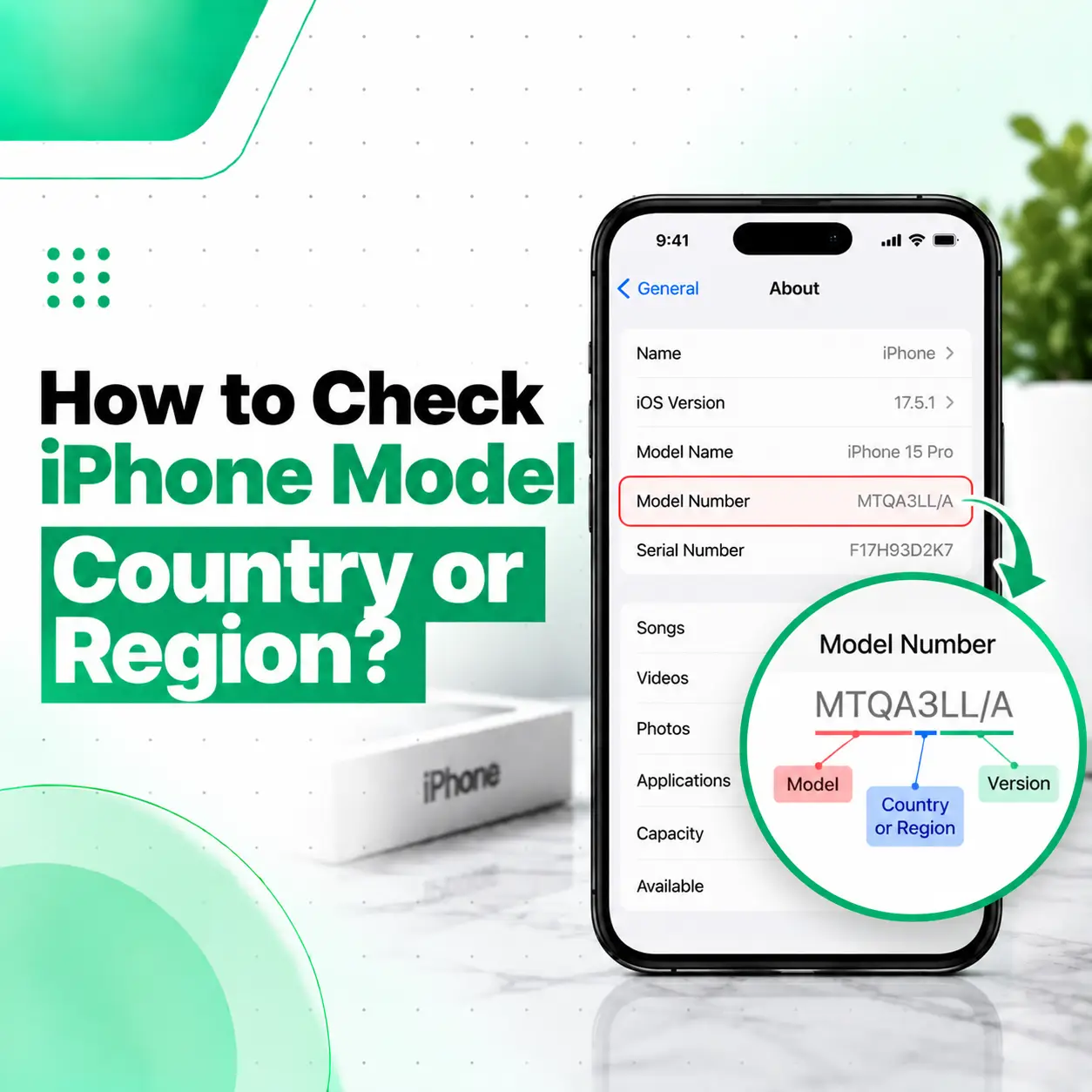
If you want to know how to check iPhone model country, the most reliable starting point is your iPhone’s model number. You can find it by going to Settings → General → About and looking at the Model Number field. Apple explains that the number initially displayed there is the device’s part number; tapping it reveals the A-number model identifier.
The A-number can then be compared with Apple’s official iPhone model list to identify which countries or regions that hardware variant was designed for. This is more reliable than judging the country from the phone’s appearance, packaging, or language settings.
This guide explains how to check the country or region associated with your iPhone, what the different numbers mean, and why regional variants can matter when buying or repairing an iPhone in Bangladesh.
How to Check iPhone Model Country
The easiest method is to find your iPhone’s model number and compare it with Apple’s official model information.
Step 1: Open Settings
Open the Settings app on your iPhone.
Step 2: Open General
Scroll down and tap General.
Step 3: Open About
Tap About to see information about your iPhone, including its model name, serial number, capacity and model number. Apple confirms this as the standard way to locate the device’s model information.
Step 4: Find the Model Number
Look for Model Number.
You may initially see a part number with letters and numbers. Tap the number once to switch to the A-number model identifier.
For example, an iPhone may show an identifier such as:
A3290
The exact A-number depends on the iPhone model and its regional hardware configuration.
Step 5: Compare the A-Number With Apple’s Model List
Once you have the A-number, compare it with Apple’s official Identify your iPhone model page.
Apple lists different A-numbers for different countries and regions. For example, Apple’s current specifications show that some iPhone generations have separate model numbers for the United States, China mainland, Japan, and other countries or regions.
What Does the iPhone A-Number Tell You?
The A-number identifies a particular hardware model or regional variant of an iPhone.
It is important to understand that the A-number does not necessarily mean that the phone was physically manufactured in that country. Instead, Apple uses different model numbers for iPhones intended for particular countries or groups of regions.
For example, Apple’s current iPhone model documentation groups some model numbers according to markets such as:
- United States and Puerto Rico
- China mainland
- Japan
- Canada
- Middle Eastern markets
- Other countries and regions
The exact regional grouping varies by iPhone generation.
A-Number vs Part Number
These two numbers are easy to confuse.
| Identifier | What it represents |
| Part number | The complete Apple product/variant identifier shown initially in Settings |
| A-number | The hardware model identifier used by Apple to distinguish iPhone models and regional variants |
| Serial number | A unique identifier for an individual device |
| IMEI | A unique identifier associated with the device’s cellular hardware |
For checking the hardware region, the A-number is particularly useful because Apple’s model documentation maps it to specific countries or groups of regions.
How to Check iPhone Region Without the Box
You do not need the original box to identify the iPhone’s hardware region.
The simplest method is:
Settings → General → About → Model Number
Tap the model number to reveal the A-number, then compare that number with Apple’s model list.
This is particularly useful when buying a used iPhone in Bangladesh and the original packaging is unavailable.
What If You Cannot Access Settings?
Apple provides additional ways to locate the model number depending on the iPhone.
On some older models, the model number can be found on the back of the device. On iPhones with a physical SIM tray, Apple says the model number may be visible inside the SIM-tray slot. On models without a SIM tray, it may be located inside the Lightning or USB-C connector area.
You should use good lighting and handle the SIM tray carefully if you need to inspect it.
How to Identify the Country From an iPhone Model Number
After finding the A-number, search for that exact number in Apple’s official model-identification documentation.
For example, Apple currently lists different A-numbers for several recent iPhone models.
For the iPhone 16, Apple lists:
| iPhone 16 model number | Apple-listed market |
| A3081 | United States |
| A3286 | Bahrain, Canada, Iraq, Guam, Japan, Jordan, Kuwait, Mexico, Oman, Qatar, Saudi Arabia, UAE and U.S. Virgin Islands |
| A3288 | China mainland, Hong Kong and Macao |
| A3287 | Other countries and regions |
These regional assignments come directly from Apple’s current model documentation.
The important point is that you should not assume one universal country code applies to every iPhone generation. Apple can change the regional grouping and model numbers between generations.
Example: iPhone 15
Apple’s documentation similarly separates iPhone 15 models into different regional variants. For example, the iPhone 15 uses A2846 for the United States and A3092 for China mainland, Hong Kong and Macao, while A3090 covers other countries and regions.
This is why checking the exact iPhone model generation is important.
Is the iPhone Model Number the Same as the Country Code?
No. An iPhone model number and a country or region code are not the same thing.
The A-number identifies the hardware model variant. Apple’s documentation then tells you which countries or regions that particular model number is associated with.
You may also see a longer Apple part number in Settings that contains additional characters. That identifier can contain information about the product configuration, but it should not be treated as a simple standalone “country code.”
Why the Difference Matters
Confusing these identifiers can lead to incorrect conclusions about an iPhone.
For example:
- A-number: helps identify the hardware model and regional variant.
- Part number: identifies a specific Apple product configuration.
- Serial number: identifies the individual device.
- IMEI: identifies the cellular device.
Use the appropriate identifier for the question you are trying to answer.
Does iPhone Country or Region Affect the Phone?
Yes, a regional variant can affect certain hardware or network-related features, but the exact differences depend on the iPhone generation and destination market.
Apple’s model documentation shows that some regional variants can differ in areas such as SIM configuration. For recent iPhone generations, Apple specifies that some markets have no physical SIM tray while other regions retain a physical nano-SIM slot.
Other region-dependent differences can include cellular compatibility and regulatory requirements.
SIM and eSIM Differences
SIM configuration is one of the most noticeable regional differences.
For example, Apple’s documentation states that some current U.S. iPhone models do not have a physical SIM tray, while many other regional variants include a physical nano-SIM slot.
This matters when purchasing an imported iPhone for use in Bangladesh.
Cellular Compatibility
Regional models can also have differences in supported cellular hardware or configurations.
Therefore, if you are purchasing an imported iPhone, do not rely solely on the model’s name, such as “iPhone 16 Pro Max.” Check the exact model number and verify compatibility with your intended carrier and network.
How to Check if an Imported iPhone Is Suitable for Bangladesh
If you are buying an imported iPhone in Bangladesh, checking the model region is useful, but it should not be the only check.
Before purchasing, verify:
- Exact iPhone model
- A-number
- SIM/eSIM configuration
- Network compatibility
- IMEI
- Activation status
- Physical condition
- Battery condition
- Parts or repair history where relevant
- Seller’s warranty or return terms
Regional compatibility can vary by model generation, so the exact A-number should be checked rather than relying on statements such as “US version” or “international version.”
Does the Country of an iPhone Affect Repair?
The country or regional variant can sometimes matter when diagnosing or repairing an iPhone, particularly when the hardware configuration differs between markets.
For example, differences in SIM configuration or other region-specific hardware can affect how a technician approaches diagnosis.
However, many routine repairs—such as screen, battery, speaker, camera, or charging-related repairs—are primarily determined by the exact iPhone model and the component involved.
Why Exact Model Identification Matters
Before ordering a replacement part, a repair technician should identify the exact device model.
This helps reduce the risk of using an incompatible component.
For a professional repair service in Bangladesh, providing the exact model number can make the initial assessment more precise, particularly when different regional variants exist.
Can You Check the iPhone Country From the IMEI?
The IMEI can identify the individual cellular device, but it should not be treated as a simple replacement for Apple’s model-number method when determining the regional hardware variant.
For region identification, Apple’s official model documentation provides a direct way to compare the A-number with its listed markets.
If you are checking an iPhone before buying it, the IMEI can still be useful for other checks, such as identifying the device and verifying information through appropriate official or carrier services.
What Is the Difference Between Country of Manufacture and Country of Sale?
These are two different concepts.
An iPhone may be manufactured or assembled in one location but designed for sale in another market. The model number primarily helps identify the market or regional hardware variant, not necessarily the physical factory where the device was manufactured.
Therefore, if someone asks, “Which country is this iPhone from?” clarify what they mean:
- Where was it manufactured?
- Which market was it intended for?
- Which regional hardware version is it?
- Where was it originally sold?
For most buyers checking an imported iPhone, the intended market or regional variant is the more useful question.
Should You Check the iPhone Model Country Before Buying a Used iPhone?
Yes. Checking the model number is a useful part of evaluating a used or imported iPhone.
Before purchasing, compare the seller’s description with the actual information shown on the device.
Quick Used-iPhone Checklist
| Check | Why it matters |
| Model name | Confirms the advertised iPhone generation |
| A-number | Helps identify regional hardware variant |
| Serial number | Identifies the individual device |
| IMEI | Useful for device and network-related checks |
| Battery Health | Helps assess battery condition |
| Parts & Service History | Can reveal certain repair information on supported models |
| SIM configuration | Important for imported devices |
| Physical condition | Helps identify damage |
| Activation status | Important when buying a used device |
Do not rely solely on the box or seller’s description. Compare the information displayed on the iPhone itself.
When Should You Get Professional iPhone Help?
Checking an iPhone’s model country or region normally does not require a repair technician. You can usually find the necessary information through Settings → General → About.
However, professional help may be useful if the device has additional problems—for example, a damaged screen that prevents you from navigating Settings, a malfunctioning touchscreen, charging problems, or other hardware issues.
If an iPhone needs physical inspection or repair, iCareFix Phone Repair can assess the device and determine the relevant model and hardware configuration before recommending a repair.
Frequently Asked Questions
1. How do I check my iPhone model country?
Go to Settings → General → About, find Model Number, and tap it to reveal the A-number. Compare that number with Apple’s official iPhone model list to see which countries or regions Apple associates with that hardware variant. The A-number identifies the regional hardware model; it does not necessarily indicate where the phone was physically manufactured.
2. Where can I find the iPhone model number?
Open Settings → General → About and look for Model Number. Apple notes that the displayed value is initially the part number; tapping it reveals the A-number model identifier. Depending on the iPhone, the model number may also be found on the device, inside the SIM-tray area, or near the charging connector.
3. Does the iPhone A-number show the country?
The A-number identifies an iPhone hardware model that Apple associates with particular countries or regions. It is not simply a country code. You need to compare the complete A-number with Apple’s model documentation because the regional assignment differs between iPhone generations.
4. Can two iPhones of the same model have different country variants?
Yes. The same iPhone generation can have different A-numbers for different markets. Apple currently documents separate regional model numbers for several iPhone generations, including variants for the United States, China mainland, Japan and other groups of countries or regions. Hardware differences can include SIM configuration and other regional requirements.
5. Does the iPhone country variant affect SIM compatibility?
It can. Apple documents regional differences in physical SIM availability. For some recent iPhone models, certain markets have no physical SIM tray, while other regional versions support a physical nano-SIM. Therefore, check the exact model before buying an imported iPhone for use in Bangladesh.
6. Is the country of manufacture the same as the iPhone’s model country?
No. The regional model generally indicates the market or hardware variant the iPhone was designed for, not necessarily the physical location where it was manufactured or assembled. If you are checking an imported iPhone, the more useful question is usually which market the device was intended for and whether its hardware is compatible with your needs.
7. Do I need professional repair to check my iPhone model country?
Usually, no. You can check the model number yourself through Settings. Professional help may become useful if a damaged screen, faulty touchscreen, or another device problem prevents you from accessing the information. A repair technician can also identify the exact device configuration when assessing an iPhone for repair.
Conclusion
Learning how to check iPhone model country is mainly a matter of finding the correct model identifier and comparing it with Apple’s official documentation. Start with Settings → General → About → Model Number, tap the number to reveal the A-number, and then check Apple’s current model list for its associated countries or regions.
Remember that the regional model is not necessarily the same as the phone’s manufacturing location. It can, however, be relevant when checking SIM configuration, network compatibility, imported-device suitability, and certain hardware differences.
If you’re having trouble accessing your iPhone’s model information because of a damaged screen, touchscreen, charging issue, or another hardware problem, iCareFix Phone Repair can inspect the device and help identify the appropriate repair requirements.