




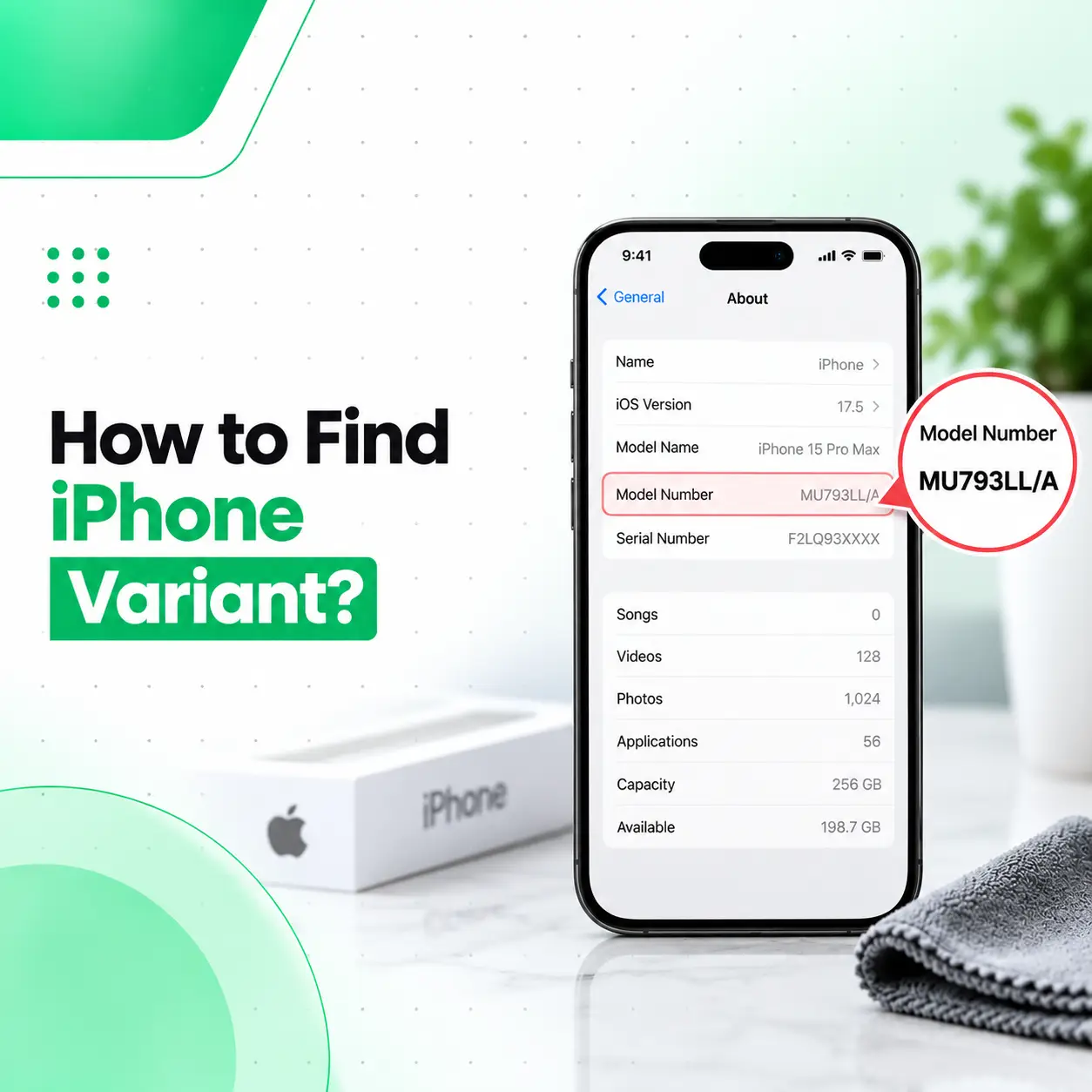
If you want to know how to find iPhone variant, the most reliable method is to check the device’s actual model number and compare it with Apple’s official model-identification information. Go to Settings > General > About, find Model Number, then tap the displayed part number to reveal the A-number, such as Axxxx. Apple uses different A-numbers for certain country or region groups, and these can help identify whether an iPhone is a US model, China mainland model, or a model intended for other markets.
Variant checking is especially useful in Bangladesh, where many iPhones are imported from different markets. This guide explains how to check the model number, identify regional differences, understand SIM and eSIM configurations, and avoid relying on unreliable seller labels.
What Does iPhone Variant Mean?
An iPhone variant usually refers to the regional or market-specific version of a particular iPhone model.
For example, the same iPhone generation may have different model numbers for:
- United States
- China mainland
- Hong Kong or Macao on some generations
- Japan or certain Gulf markets
- Other countries and regions
These variants can differ in areas such as:
- Physical SIM availability
- eSIM support
- Dual SIM configuration
- Cellular band support
- Regulatory requirements
- Region-specific hardware details
The basic iPhone model—such as iPhone 16 Pro—can be the same while the regional A-number differs.
How to Find iPhone Variant From Settings
The easiest way is through the About screen.
Step 1: Open Settings
Go to:
Settings > General > About
Step 2: Find Model Number
Look for:
Model Number
Apple explains that the value initially shown beside Model Number is the part number. Tap it once to display the actual model number beginning with A.
For example:
Axxxx
This A-number is the most useful identifier for determining the regional model.
Step 3: Compare the A-Number With Apple’s Model List
Apple maintains an official Identify your iPhone model page listing model numbers by generation and country or region group.
Find your iPhone generation, then compare its A-number.
This is more reliable than trusting a seller who simply says:
- “USA variant”
- “Dubai variant”
- “Singapore variant”
- “Global variant”
What Is the Difference Between Part Number and Model Number?
These are related but different identifiers.
Part Number
When you first open:
Settings > General > About
you normally see a part number beside Model Number.
Model Number
Tap the part number, and Apple shows an A-number, such as:
A3293
Apple specifically instructs users to tap the part number to reveal the actual model number.
For regional identification, the A-number is usually the more dependable reference because Apple publicly maps those numbers to countries and regions.
What Does an iPhone A-Number Tell You?
The A-number identifies a particular hardware/regional model.
For example, Apple’s official information for iPhone 16 Pro lists different A-numbers for different markets, including separate models for the United States, China-region markets, certain international regions, and other countries or regions.
This means two phones that both say iPhone 16 Pro can still have different A-numbers.
That difference may affect:
- SIM tray availability
- eSIM setup
- supported cellular configurations
- region-specific hardware behavior
How to Check Which Country Your iPhone Variant Is From
Use this method:
- Open Settings > General > About.
- Tap Model Number to reveal the A-number.
- Note the exact A-number.
- Open Apple’s official model-identification list.
- Find your iPhone generation.
- Match the A-number with the listed region.
This will normally identify a country or region group, not necessarily one single country.
For example, one model number may be shared by multiple countries.
Can You Identify iPhone Variant From the Suffix Like LL/A?
Part-number suffixes such as labels commonly discussed online may provide clues about sales-region coding, but they should not be your only verification method.
For a more dependable check, use:
- Apple’s official A-number mapping
- SIM tray configuration
- eSIM support
- Model Name
- IMEI and device information
Apple’s public support documentation directly maps A-numbers to region groups, which makes that method more suitable for verification.
How to Find iPhone Variant Without Opening Settings
If the iPhone cannot be fully accessed, Apple provides several physical locations where the model number may be visible depending on the device.
iPhone 7 or Earlier
On some older models, the model number is printed on the back.
iPhone 8 or Later With a SIM Tray
Apple says the model number may be visible inside the SIM tray opening.
iPhone Without a SIM Tray
For supported models without a SIM tray, Apple says the model number can be found inside the USB-C or Lightning connector opening.
Good lighting may be required because the text is very small.
How to Check Whether an iPhone Is a US Variant
The best way is to check the A-number.
Apple assigns specific model numbers to US versions of many iPhone generations.
On several recent US-market iPhones, another strong clue is the absence of a physical SIM tray.
For example, Apple’s model-identification information states that some recent US variants have no SIM tray, while versions for other regions include a physical nano-SIM tray.
However, do not identify a phone as US-only based only on the missing SIM tray, because regional configurations can change between generations.
Always verify the A-number.
Do US iPhone Variants Have Physical SIM?
For several recent iPhone generations, US-market versions have moved toward eSIM-only operation.
Apple’s current model pages show that certain US models do not have a physical SIM tray, while versions sold in many other regions do.
This matters for buyers in Bangladesh because you should confirm that your mobile operator supports the SIM configuration you plan to use.
What Is eSIM?
An eSIM is a digital SIM built into the iPhone.
Apple describes eSIM as an industry-standard digital SIM that allows mobile service without inserting a physical SIM card.
Depending on the model and region, an iPhone may support:
- Physical nano-SIM
- Physical SIM + eSIM
- Dual eSIM
- eSIM-only operation
Does iPhone Variant Affect eSIM Support?
Yes, it can.
Apple notes that physical SIM support is not available on every iPhone model and that eSIM availability also varies by country and region.
This is one reason variant checking matters before purchasing an imported iPhone.
A phone designed for one market may have a different SIM configuration from a phone of the same generation sold elsewhere.
Does iPhone Variant Affect Dual SIM?
It can.
Apple currently supports several Dual SIM configurations depending on model and region, including:
- One physical SIM + one eSIM
- Two eSIMs
Apple also notes that physical SIM is not supported on all models and eSIM is not available in all countries or regions.
So do not assume every iPhone of the same generation has identical SIM behavior.
How to Check SIM Configuration on Your iPhone
Open:
Settings > General > About
Apple lists available SIM information, IMEI, EID, Carrier Lock status, and other cellular identifiers on this screen.
Also physically inspect the phone.
Check whether it has:
- SIM tray
- No SIM tray
- One physical SIM slot
Then compare that configuration with Apple’s official model information.
How to Find iPhone Variant Using IMEI
IMEI is useful for identifying the cellular device, but IMEI alone is not the simplest official method for determining the regional variant.
Apple exposes both:
- Model Number
- IMEI
under:
Settings > General > About.
For variant identification, use the A-number first.
Use IMEI mainly as an additional device identifier when:
- Checking documentation
- Comparing the phone with its box
- Checking carrier-related information
- Verifying a used phone
Can the Same iPhone Model Have Multiple A-Numbers?
Yes.
This is normal.
Apple often lists several A-numbers under the same iPhone model because different regional hardware versions exist.
For example, Apple’s current model-identification list shows multiple A-numbers for recent Pro models, each associated with specific country or region groups.
Therefore:
Model Name = product generation
while:
A-number = specific hardware/regional model
What Does “Global Variant” Mean?
“Global variant” is often a seller or market term rather than a precise Apple classification.
A seller may use it to describe a model that:
- Supports physical SIM
- Works across many regions
- Is not a US-only configuration
- Belongs to Apple’s “other countries and regions” model group
Instead of trusting the phrase “global variant,” ask for the actual:
A-number
Then verify it against Apple’s official list.
Is Dubai Variant Different From USA Variant?
It can be.
Regional iPhone models may differ in:
- A-number
- SIM tray availability
- eSIM support
- cellular configuration
- regulatory requirements
For recent generations, Apple may group Gulf countries with other specific regions under one A-number, while the US receives a separate A-number.
The exact differences depend on the iPhone generation.
Is Japan Variant Different?
Some generations use a distinct or shared regional model covering Japan and other markets.
Because Apple’s regional groupings change between generations, do not rely on a permanent rule such as “Japan variant always works this way.”
Check the exact A-number for the exact iPhone model.
Is China Variant Different?
China mainland models can have different regional configurations.
Apple often lists a dedicated A-number for China mainland.
SIM and eSIM behavior can also differ by region.
Apple notes that eSIM availability in China mainland has model-specific restrictions and support.
If buying a China-region device, confirm:
- SIM configuration
- eSIM support
- carrier compatibility
- model number
before purchase.
Which iPhone Variant Is Best for Bangladesh?
There is no single “best variant” for every buyer.
For Bangladesh, prioritize:
- Compatibility with your mobile operator
- Physical SIM/eSIM needs
- Carrier-unlocked status
- Warranty expectations
- Parts availability
- Genuine device condition
- Clear seller documentation
A physical-SIM model may be more convenient for some users, while eSIM users may prefer a different configuration.
The variant should match your network and usage needs, not simply a seller’s claim that one region is always better.
Does Variant Affect Network Signal in Bangladesh?
Potentially, but do not assume one variant automatically gives better signal.
Network performance depends on:
- Supported cellular bands
- Mobile operator
- Coverage area
- Carrier configuration
- Device condition
- SIM/eSIM provisioning
Most modern iPhone regional models support broad cellular compatibility, but exact specifications should be checked when buying an imported model.
How to Check Whether an iPhone Is Carrier Locked
Open:
Settings > General > About
Look for:
Carrier Lock
Apple includes Carrier Lock information on the About screen.
A phone can be:
- Genuine
- Correct regional variant
- Yet still carrier locked
These are separate issues.
For imported devices, check Carrier Lock before payment.
Does Carrier Lock Tell You the Variant?
No.
Carrier Lock tells you whether the device is restricted to a specific carrier.
Variant tells you which regional hardware/model version you have.
For example, a US variant can be:
- Carrier unlocked
- Carrier locked
So do not use Carrier Lock as a substitute for checking the A-number.
How to Check iPhone Variant Before Buying a Used Phone
Use this checklist:
- Open Settings > General > About.
- Confirm Model Name.
- Tap Model Number to reveal the A-number.
- Compare the A-number with Apple’s official model list.
- Check IMEI.
- Check available SIM/eSIM information.
- Inspect whether a SIM tray is present.
- Check Carrier Lock.
- Test your SIM or eSIM if possible.
- Confirm the phone matches seller claims.
For a used iPhone in Bangladesh, this is more reliable than accepting terms such as “US,” “Dubai,” or “international” without verification.
Does the Box Show the iPhone Variant?
The original packaging can include useful device identifiers.
But boxes can be:
- Mismatched
- Replaced
- Reused
Always verify the phone itself through Settings.
The device’s actual model number should be your primary reference.
Why Does the Box and Phone Model Information Sometimes Differ?
Possible reasons include:
- Wrong box
- Replacement box
- Seller mix-up
- Previously replaced device
- Incorrect listing
If the identifiers do not match, investigate before purchasing.
For a used device, a mismatch is a reason to perform additional checks.
Can Changing the Region in Settings Change the iPhone Variant?
No.
Changing:
Settings > General > Language & Region
does not change the physical hardware variant.
Your iPhone’s A-number is tied to the hardware model.
Changing the software region can affect:
- Date format
- Language
- Calendar
- regional software preferences
but it does not turn a US hardware model into another regional variant.
Does Changing Apple Account Country Change the Variant?
No.
Your Apple Account country or App Store region does not change the physical iPhone model number.
Hardware variant and account region are separate.
This is an important distinction when checking imported iPhones.
Can Software Update Change the Variant?
No.
An iOS update does not change the iPhone’s A-number.
The regional hardware model remains the same.
Software updates may change features or carrier behavior, but they do not convert one hardware variant into another.
Is Variant the Same as Model?
Not exactly.
For example:
iPhone 16 Pro = model/product name
while:
Axxxx = a specific regional version of that model
Several A-numbers can exist under the same iPhone product name.
That is why saying only “iPhone 16 Pro” does not fully identify the variant.
Is Variant the Same as Storage?
No.
Storage options such as:
- 128GB
- 256GB
- 512GB
- 1TB
are capacity choices, not regional variants.
Two iPhones can have the same storage but different A-numbers.
Is Variant the Same as Color?
No.
Color has nothing to do with the regional hardware variant.
Use Model Number, not color, to determine the variant.
Why Variant Matters for iPhone Buyers in Bangladesh
Bangladesh has a large market for imported iPhones.
A buyer may encounter devices described as:
- US variant
- Dubai variant
- Japan variant
- China variant
- Singapore variant
- Global variant
Before choosing based on the label, confirm:
- Exact A-number
- Physical SIM availability
- eSIM support
- Carrier Lock
- Network compatibility
- Warranty implications
This avoids buying a configuration that does not match your needs.
Is Variant Checking a Repair Issue?
Usually not.
Variant identification is mainly a device-information and buying-verification task.
Professional phone repair becomes relevant if:
- SIM is not detected despite compatible hardware
- eSIM cannot activate because of device faults
- Network signal is abnormal
- SIM tray is damaged
- Cellular hardware is failing
Do not assume every network problem is caused by the wrong variant.
When Should You Seek Professional iPhone Support?
Professional inspection may help when the iPhone:
- Shows No SIM repeatedly
- Loses network unexpectedly
- Has a damaged SIM tray
- Cannot detect a known-working SIM
- Has impact or liquid damage
- Shows hardware-related cellular problems
For users in Bangladesh, iCareFix can inspect whether a network or SIM problem is hardware-related. However, the basic regional variant itself should be identified using Apple’s model-number information.
Frequently Asked Questions
1. How do I find my iPhone variant?
Open Settings > General > About and locate Model Number. Tap the displayed part number once to reveal the actual A-number. Then compare that A-number with Apple’s official iPhone model-identification list to see which country or region group the device belongs to.
2. How do I check which country my iPhone is from?
Find the A-number under Settings > General > About > Model Number, then match it against Apple’s official regional model list. Apple normally identifies model numbers by country or region group, so one A-number may correspond to several countries rather than one exact country.
3. What does the iPhone A-number mean?
The A-number identifies a specific hardware model or regional version of an iPhone generation. The same product name can have several A-numbers for different markets. Apple publishes these A-numbers on its official model-identification pages, making them useful for verifying regional variants.
4. How can I tell if an iPhone is a US variant?
Check the A-number and compare it with Apple’s model list. For some newer models, another clue is the lack of a physical SIM tray on US versions. However, SIM configuration changes across generations, so the A-number should remain your primary verification method.
5. Is the US iPhone variant different from other variants?
It can be. Depending on the generation, US models may use different A-numbers and may have different physical SIM or eSIM configurations. Other regional variants can also have their own model numbers. The exact difference should be checked for the specific iPhone generation rather than assumed.
6. Does iPhone variant affect SIM or eSIM support?
Yes. Apple states that physical SIM is not supported on every model and eSIM availability varies by country and region. Some iPhones support physical SIM plus eSIM, while others support dual eSIM or eSIM-only operation.
7. Which iPhone variant should I buy in Bangladesh?
Choose based on network compatibility, SIM/eSIM requirements, carrier-unlocked status, warranty expectations, and device condition. Do not assume the US, Dubai, Japan, or another variant is automatically best. Verify the A-number and confirm that its SIM configuration fits how you plan to use the phone in Bangladesh.
Conclusion
Learning how to find iPhone variant is easier when you use Apple’s official model-number system rather than relying on seller labels.
The most reliable process is:
- Open Settings > General > About.
- Find Model Number.
- Tap it to reveal the A-number.
- Compare the A-number with Apple’s official model list.
- Check SIM tray configuration.
- Check eSIM support.
- Review Carrier Lock.
- Verify IMEI and other device information if buying used.
Apple confirms that Model Name, Model Number, IMEI, EID, Carrier Lock, network information, and available SIM information can all be viewed from the About screen.
For buyers in Bangladesh, avoid relying only on terms such as “US variant,” “Dubai variant,” or “global variant.” Verify the actual hardware model first.
If your iPhone has a real SIM, network, or cellular hardware problem rather than a variant-identification question, iCareFix can inspect the device and determine whether professional repair is necessary.